
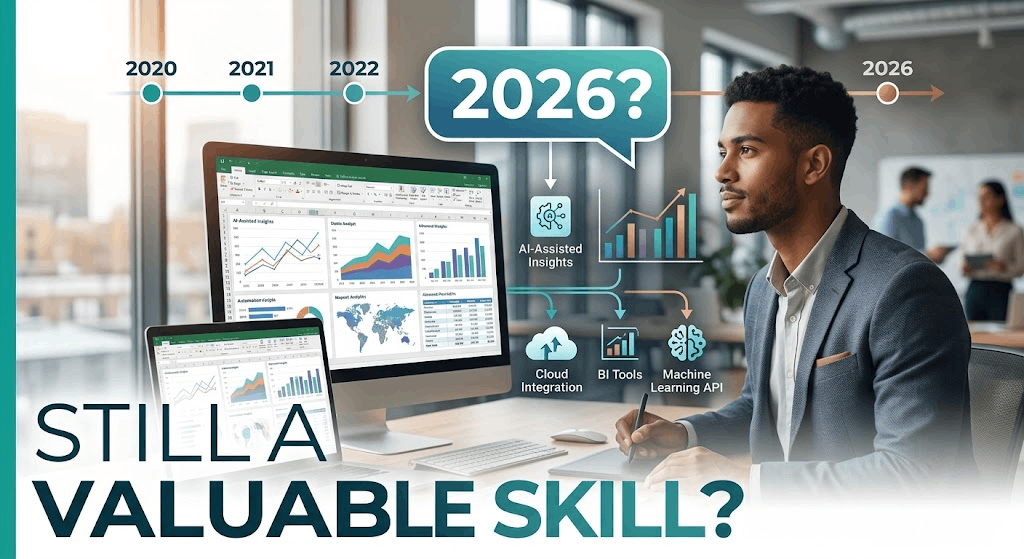
Is Excel Still a Valuable Skill in 2026?
Yes, Excel is still a valuable skill in 2026.
The bigger question is how much Excel you should learn.
Basic spreadsheets are no longer enough to stand out. Modern Excel includes advanced formulas, PivotTables, Power Query, data modeling, automation, and AI-assisted analysis. Microsoft also continues adding Copilot features that can generate formulas, create PivotTables and charts, analyze trends, and work directly with workbook data.
That makes Excel useful far beyond simple budgeting.
| Day-One Metric | Beginner Estimate |
|---|---|
| Hours to basic competency | 30–60 hours |
| Minimum software budget | $0–subscription dependent |
| Difficulty | 2.5/5 |
| Free prerequisites | Basic computer skills |
| First portfolio target | 1 practical spreadsheet project |
Why Excel Is Still Worth Learning in 2026
Excel remains useful because it solves a huge range of everyday business problems.
People use it for:
- Financial analysis
- Sales tracking
- Budgets
- Inventory management
- Project planning
- Reporting
- Data cleaning
- Forecasting
- Business analysis
- Operations
- Marketing reports
- Personal finance
The software has also moved well beyond the traditional spreadsheet.
Microsoft’s current Excel documentation covers XLOOKUP, PivotTables, Power Query, data analysis, and AI-powered Copilot features.
So learning Excel in 2026 doesn’t mean memorizing hundreds of formulas.
It means learning how to organize, analyze, automate, and communicate information.

Is Excel Still a Good Career Skill?
Yes—but Excel is usually better viewed as a career multiplier than a career by itself.
Knowing Excel can strengthen your profile in many roles.
For example:
Business and Operations
Excel can help you track:
- Costs
- Inventory
- Orders
- Performance
- Staffing
- KPIs
Finance and Accounting
Excel remains useful for:
- Financial models
- Budgeting
- Forecasting
- Reconciliation
- Financial reporting
Marketing
Marketers can use Excel to analyze:
- Campaign performance
- Leads
- Customer data
- Advertising results
- Content performance
Data Analysis
Excel can be a starting point before moving into:
Excel → SQL → Power BI → Python
This makes it particularly useful for beginners who want to enter analytics without starting with programming.
What Excel Skills Should You Learn in 2026?
Don’t try to learn everything.
Focus on these five levels.
1. Spreadsheet Fundamentals
Start with:
- Formatting
- Tables
- Sorting
- Filtering
- Freeze panes
- Basic charts
- Data validation
- Relative and absolute references
These concepts sound simple.
They are also where many beginners should start.
2. Essential Formulas
Learn formulas that solve common problems.
Start with:
SUMAVERAGECOUNTIFSUMIFSCOUNTIFSXLOOKUPIFERROR- Text functions
- Date functions
You don’t need to memorize every function.
Learn how to find and apply the right function.
3. PivotTables
PivotTables can turn large tables into useful summaries quickly.
You can use them to answer questions such as:
- Which products generated the most sales?
- Which region performed best?
- How did revenue change by month?
- Which customers generated the most orders?
They’re especially useful when you need to explore data without writing complicated formulas.
4. Power Query
Power Query is one of the most valuable Excel skills to learn after the basics.
Microsoft describes Power Query as a tool for importing, connecting, and transforming external data. You can remove columns, change data types, merge tables, and refresh the resulting queries.
This matters because real-world data is messy.
Instead of repeatedly cleaning the same spreadsheet manually, you can build a repeatable transformation process.
5. Automation and AI
Once you understand Excel, learn how to make repetitive work faster.
This can include:
- Power Query
- Excel templates
- Macros
- VBA
- Office Scripts
- Copilot
You don’t necessarily need to become a VBA programmer.
The important skill is recognizing which tasks should be automated.
Will AI Make Excel Obsolete?
Probably not.
AI is changing how people use Excel, but it is also making Excel more accessible.
Microsoft’s current Copilot features can create formulas, generate charts and PivotTables, identify trends, sort and filter data, and help users analyze workbook information.
That means some manual Excel tasks are becoming easier.
It also creates a new requirement:
You need to understand enough Excel to verify what AI produces.
Microsoft explicitly warns that Copilot-generated results can be inaccurate and should be reviewed and verified before being relied upon.
A person who understands spreadsheets can catch mistakes.
Someone who simply copies an AI-generated formula may not.
The Beginner Friction Factor: Wrong References
One of the most common Excel problems for beginners is incorrect cell references.
For example, you might create a formula using a relative reference when you actually need an absolute reference.
Suppose you have:
=B2*$F$1
The $F$1 reference stays fixed when you copy the formula down.
Without the dollar signs:
=B2*F1
Excel may change the reference as you copy the formula.
When a calculation suddenly produces strange numbers, check:
- Which cells the formula references.
- Whether the reference should move.
- Whether
$should be used. - Whether the source values have the correct data type.
- Whether the formula works correctly on one row before copying it.
Learning to troubleshoot formulas is more useful than memorizing hundreds of functions.
Excel vs Google Sheets: Which Should You Learn?
Both are useful.
Google Sheets is excellent for browser-based collaboration and simple shared workflows.
Excel is particularly valuable when you need deeper spreadsheet functionality, advanced data tools, Power Query, Power Pivot, or compatibility with established business workflows.
You don’t need to choose permanently.
Learning Excel first can make it easier to understand other spreadsheet applications later.
The underlying concepts transfer well.
What Jobs Benefit From Excel Skills?
Excel appears across far more jobs than many beginners expect.
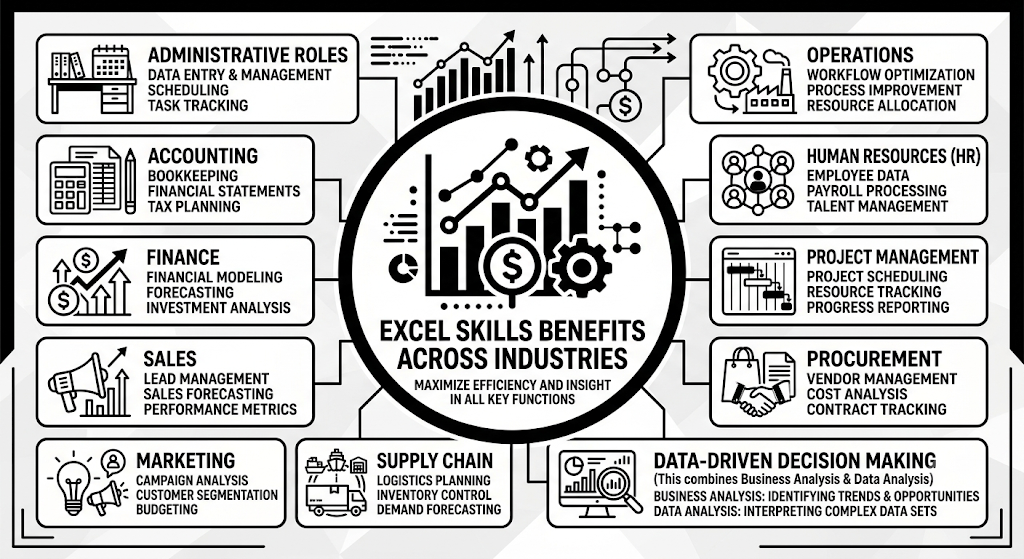
You can benefit from Excel skills in:
- Administrative roles
- Accounting
- Finance
- Sales
- Marketing
- Operations
- Human resources
- Project management
- Procurement
- Supply chain
- Business analysis
- Data analysis
This is one reason Excel is such a practical skill.
You aren’t locked into one career.
You can carry the skill into different departments and industries.
[IMAGE_START]
Image Generation Prompt: Professional editorial overhead photograph showing a clean workspace with one laptop displaying an abstract spreadsheet dashboard, surrounded by subtle physical objects representing business operations: calculator, project planning notebook, sales report sheets with blurred tables, and inventory notes. Natural soft daylight, realistic shadows, warm wood, matte gray and soft white tones, minimalist composition. No words, no typography, no letters, no logos, no user interface labels. No money piles, corporate handshake imagery, glowing data graphics, or distorted screen text.
Caption: Excel skills transfer across finance, operations, marketing, sales, administration, and analytics.
[IMAGE_END]
Can Excel Help You Get a Job?
Excel alone usually won’t guarantee a job.
But demonstrating Excel ability can make you more useful in many entry-level positions.
A certificate is also less convincing than a practical example.
Build a small project such as:
Monthly Sales Dashboard
Include:
- Raw sales data
- Cleaned data
- XLOOKUP formulas
- PivotTables
- Charts
- Monthly KPIs
- A short written analysis
Then explain what your spreadsheet reveals.
For example:
“Sales increased 18% in Q3, but most growth came from two product categories.”
That demonstrates more than knowing how to create a chart.
It shows that you can turn spreadsheet data into a business observation.
Best Way to Learn Excel in 2026
Start with free resources before buying anything.
Microsoft provides official Excel learning materials covering formulas, functions, PivotTables, data analysis, formatting, and troubleshooting.
A sensible learning order is:
Basics → Formulas → Tables → PivotTables → Charts → Power Query → Data Modeling → Automation → AI
Don’t spend weeks watching tutorials without touching Excel.
Use a real dataset as soon as possible.
Try rebuilding a report you see at work or creating a dashboard around a topic you understand.
Should You Take a Course?
A course can help if you need structure.
But you don’t need an expensive certification to start.
When evaluating a course, look for:
- Hands-on exercises
- Downloadable datasets
- Realistic projects
- Formula practice
- Data cleaning
- PivotTables
- Power Query
- Updated Excel interface
Avoid courses that spend hours teaching basic formatting without progressing toward practical work.
What Should You Learn After Excel?
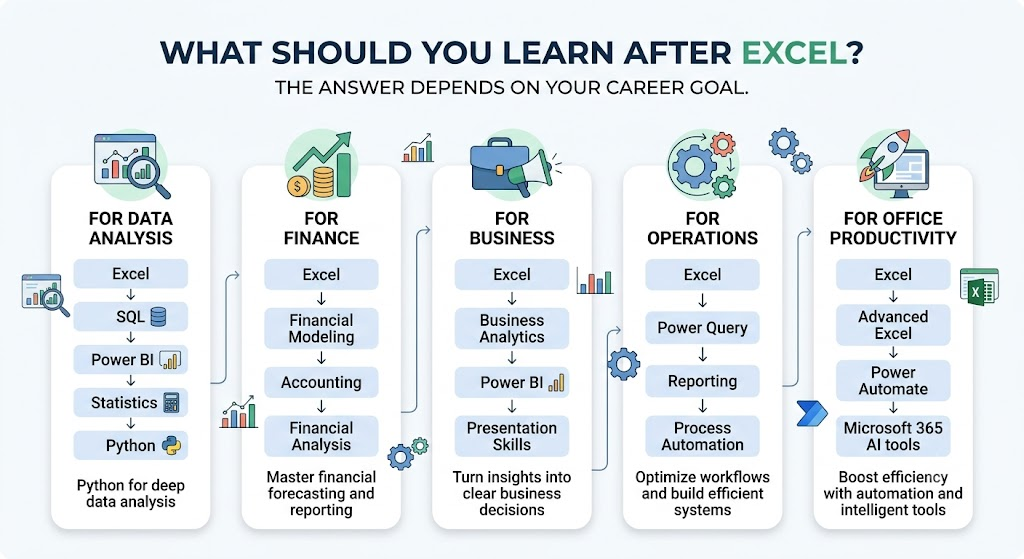
The answer depends on your career goal.
For Data Analysis
Learn:
Excel → SQL → Power BI → Statistics → Python
For Finance
Learn:
Excel → Financial Modeling → Accounting → Financial Analysis
For Business
Learn:
Excel → Business Analytics → Power BI → Presentation Skills
For Operations
Learn:
Excel → Power Query → Reporting → Process Automation
For Office Productivity
Learn:
Excel → Advanced Excel → Power Automate → Microsoft 365 AI tools
Excel becomes much more valuable when combined with another skill.
Is Advanced Excel Worth Learning?
Absolutely—if your work involves data.
But “advanced Excel” should mean more than obscure formulas.
A strong advanced Excel user should be able to:
- Clean messy datasets
- Build reusable reports
- Create PivotTables
- Use advanced formulas
- Import external data
- Transform data with Power Query
- Build useful dashboards
- Troubleshoot errors
- Automate repetitive work
- Validate AI-generated results
Microsoft’s Power Pivot tools also support data modeling, relationships between tables, and calculations for larger datasets.
That’s a much more valuable skill set than simply being fast at entering numbers.

Your Day-One Excel Action Plan
You can start without buying an expensive course.
- Create a small dataset. Spend 20 minutes entering 30–50 rows of realistic sales, expense, or inventory data.
- Analyze it. Spend 20 minutes using tables,
SUMIFS,XLOOKUP, and a PivotTable to answer three questions. - Build one visual report. Spend the final 20 minutes creating a simple dashboard with two or three useful charts.
Don’t worry about making it beautiful.
Make it correct, readable, and useful.
Your Next Steps
- Learn Excel tables and spreadsheet fundamentals.
- Practice SUMIFS, COUNTIFS, IF, and XLOOKUP.
- Build your first PivotTable.
- Learn Power Query for repeatable data cleaning.
- Create one practical Excel dashboard.
- Add Excel to a second skill such as finance, marketing, operations, or data analysis.
- Learn how to use AI with Excel while verifying its output.
So, is Excel still a valuable skill in 2026? Yes.
But don’t learn Excel just to say you’re “good at spreadsheets.”
Learn it to analyze information, automate repetitive work, build reports, and make better decisions.
That is the version of Excel skill that remains useful even as AI becomes a bigger part of everyday work.
