Canva Branding: How Far Can You Really Take It?
Canva branding can take a small business surprisingly far.
You can build a visual identity, create social media graphics, design presentations, produce marketing materials, and maintain brand consistency from one platform.
But Canva has limits.
It works extremely well when you need speed, consistency, and practical marketing assets. It becomes less suitable when your brand needs highly customized typography, complex identity systems, advanced illustration, or professional production workflows.
| Day-One Metric | Beginner Target |
|---|---|
| Hours to Basic Competency | 3–6 hours |
| Minimum Budget Required | $0 |
| Learning Difficulty | 2/5 |
| Free Software Prerequisites | Canva Free, Google Docs |
What Can Canva Branding Actually Do?
The biggest strength of Canva branding is accessibility.
You do not need years of graphic design experience to create professional-looking marketing materials.
A small business can use Canva to create:
- Social media posts
- Instagram Stories
- Presentations
- Flyers
- Posters
- Business cards
- Email graphics
- Simple brochures
- YouTube thumbnails
- Lead magnets
- Marketing documents
You can also create reusable templates so future designs follow the same visual rules.
That matters because consistency is often more valuable than complexity for a small business.
Canva Brand Kits Make Consistency Easier
A major advantage is the ability to organize brand assets in one place.
Depending on the Canva plan and available features, you can manage elements such as:
- Brand colors
- Fonts
- Logos
- Templates
- Visual assets
This reduces a common problem for small teams.
Someone creates a social post using one shade of blue. Another person uses a slightly different shade. A third person chooses a completely different font.
Over time, the business starts looking inconsistent.
A centralized brand setup makes those decisions easier to control.
The Beginner Friction Factor: Using Templates Without Building a System
The biggest Canva branding mistake is not poor software knowledge.
It is over-relying on templates.
A template can look excellent while making your brand look exactly like hundreds of other businesses using the same design.
The solution is to customize the underlying system.
Choose your own:
- Color palette
- Typography
- Image style
- Layout patterns
- Graphic elements
- Content hierarchy
Then use templates as starting points rather than finished identities.
Can Canva Create a Complete Brand Identity?
Yes, for some businesses.
A small service business may be able to create almost everything it needs in Canva.
Imagine a freelance consultant.
They could create:
- Logo variations
- Proposal templates
- Social media graphics
- Presentation decks
- Downloadable guides
- Business cards
- Website graphics
- Email visuals
For that type of business, Canva may cover most everyday brand production.
But that does not mean Canva replaces professional branding software in every situation.
Where Canva Starts to Show Its Limits
A brand identity can involve much more than marketing graphics.
You may eventually need advanced control over:
- Vector artwork
- Custom lettering
- Typography
- Complex illustrations
- Detailed logo construction
- Print production
- Packaging
- Large-format graphics
- Advanced photo manipulation
Those tasks can require specialized tools and stronger design knowledge.
Canva is designed to make design accessible.
Professional design applications give experienced designers more control.
That distinction matters.
Canva vs Professional Design Software
Think about the problem you are trying to solve.
| Need | Canva | Professional Software |
|---|---|---|
| Social media graphics | Excellent | Often unnecessary |
| Quick marketing materials | Excellent | More time-consuming |
| Brand templates | Excellent | Possible |
| Simple logos | Good | Better for detailed work |
| Advanced vector design | Limited | Strong |
| Complex illustration | Limited | Strong |
| Advanced typography | Limited | Strong |
| Fast team collaboration | Strong | Depends on workflow |
| Beginner accessibility | Excellent | Steeper learning curve |
The question is not “Is Canva professional?”
The better question is:
“Does Canva provide enough control for this brand’s current needs?”
For many beginners and small businesses, the answer is yes.
Canva Branding Works Best With a Clear Strategy
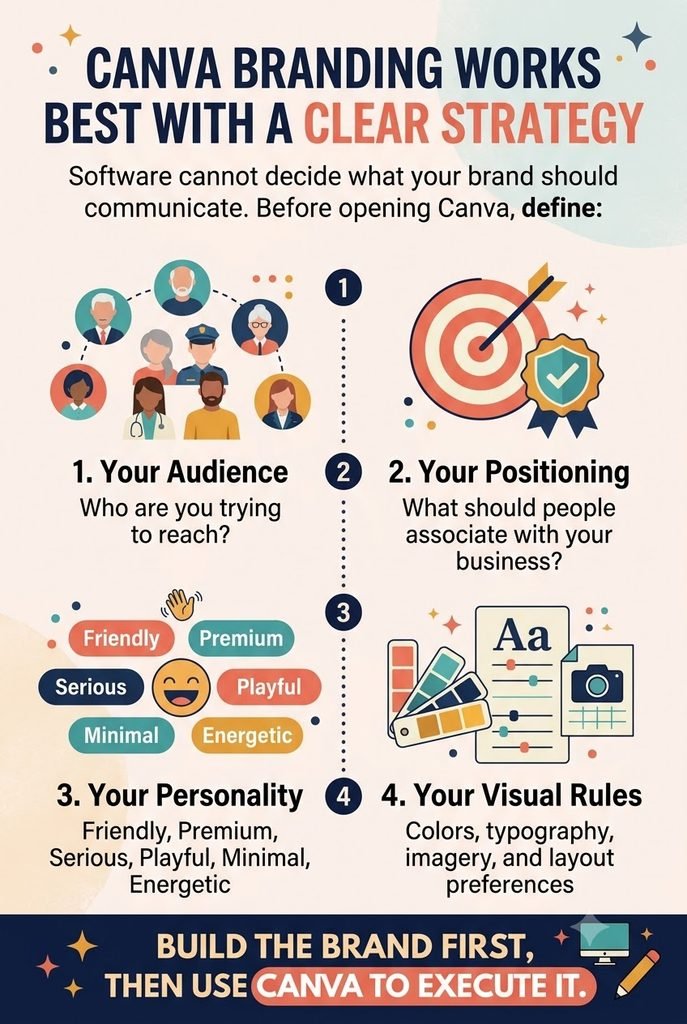
Software cannot decide what your brand should communicate.
Before opening Canva, define:
Your Audience
Who are you trying to reach?
Your Positioning
What should people associate with your business?
Your Personality
Should the brand feel:
- Friendly?
- Premium?
- Serious?
- Playful?
- Minimal?
- Energetic?
Your Visual Rules
Define your colors, typography, imagery, and layout preferences.
Only then should you turn those decisions into Canva templates.
This reverses a common beginner workflow.
Instead of finding a template and building a brand around it, build the brand first and use Canva to execute it.

How Far Can You Take Canva Branding for Social Media?
This is where Canva is particularly useful.
You can create a recognizable content system without designing every post from scratch.
For example, create templates for:
- Educational carousels
- Quotes or opinions
- Product announcements
- Customer stories
- Tips
- Promotional posts
- Stories
- Video covers
Each template can share common visual elements.
But avoid making every post identical.
A strong system should create recognition without repetition.
Change layouts, photography, headlines, and content while keeping the underlying visual language consistent.
Can You Build a Logo in Canva?
You can create a simple logo in Canva.
For a new business with limited resources, this can be perfectly reasonable.
However, be careful with originality.
If your logo depends heavily on common templates, stock elements, or generic icons, it may not provide much differentiation.
A simple wordmark can sometimes be more useful than an elaborate template-based logo.
If the business grows and the identity becomes strategically important, consider working with a professional designer.
Courses and Resources for Learning Canva Branding
You do not need to pay for a course to begin.
Canva itself provides educational material, and there are many free tutorials available online.
Paid learning becomes more useful when you want a structured project rather than isolated tips.
Canva Design for Beginners — Skillshare
Portfolio project: A collection of branded social media and marketing designs.
Ideal student: Beginners who learn best through visual, project-based instruction.
Why consider it: Skillshare’s strength is creative execution and short practical workflows.
Honest limitation: Skillshare is subscription-based. It is most useful when you plan to complete multiple classes rather than one lesson.
Graphic Design Specialization — Coursera
Portfolio project: Multiple design exercises covering typography, composition, and visual communication.
Ideal student: Beginners who want design fundamentals rather than only Canva shortcuts.
Why consider it: The conceptual foundation can help you make better Canva decisions instead of simply choosing attractive templates.
Honest limitation: It requires more time than a Canva-specific tutorial and covers broader graphic design concepts.
Coursera and edX may offer free auditing for eligible courses. Payment is generally associated with certificates or additional course features.
Free Alternative: Rebuild Three Existing Designs
Choose three pieces of branding you admire.
Recreate their structure using Canva without copying their logos, images, or proprietary assets.
Study:
- Spacing
- Alignment
- Color relationships
- Typography hierarchy
- Image placement
- Visual balance
Then create your own version for a fictional business.
This teaches design principles better than endlessly browsing templates.

What Should You Learn After Canva?
If Canva becomes your main branding tool, your next investment should be design fundamentals.
Learn:
- Typography
- Color theory
- Layout and composition
- Visual hierarchy
- Basic branding strategy
- Image selection
- Accessibility
Then decide whether you need another design application.
If your work increasingly involves detailed vector graphics, advanced illustration, or professional identity design, learning software such as Adobe Illustrator may make sense.
Do not learn advanced software simply because professionals use it.
Learn it when your design problems require the additional control.
Your Day-One Action Plan
You can test Canva’s branding capabilities within the next hour.
- Create a mini brand system.
Choose three brand colors, two fonts, one image style, and three personality words. - Build three templates.
Create one educational post, one promotional graphic, and one Story template. - Test consistency.
Put the three designs beside each other. Check whether they look like the same brand without becoming identical.
If the result feels coherent, Canva may already be enough for your current needs.
If you repeatedly hit limitations, that is useful information too.
Canva branding works best when you use it as a design system, not a template vending machine.